
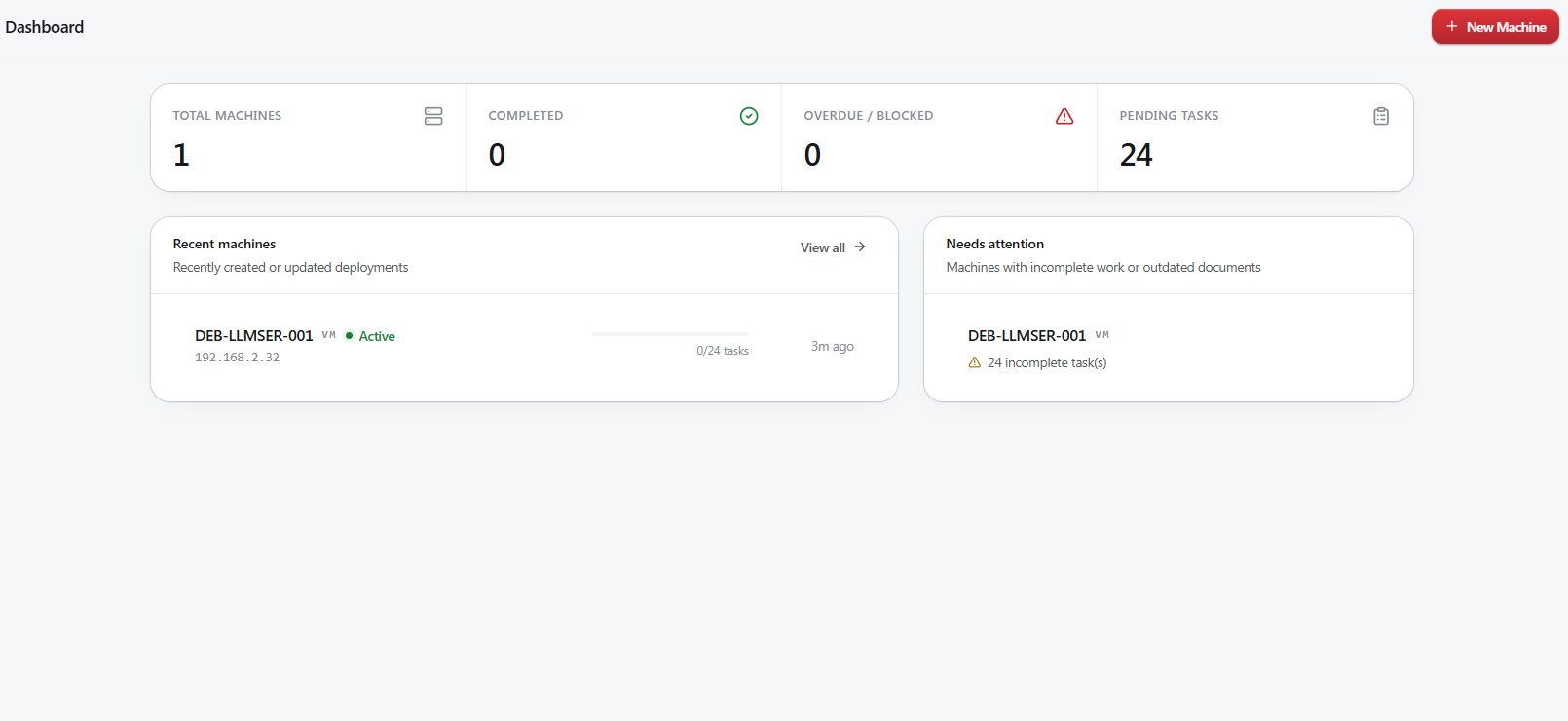
Why it exists
A homelab grows one late night at a time. You spin up a VM to try something, get it working, and move on. Six months later you are looking at an IP you do not recognize, trying to remember which host it lives on, what it runs, and whether you ever got around to opening the right ports or setting up the firewall.
I kept meaning to write all of that down in Obsidian and kept not doing it, because writing the same twenty five lines of Markdown by hand for every new container is exactly the kind of chore that never happens. So the tracking and the document generation live in the same place now. I fill in a form while I am building the machine, and the notes come out the other end.
It is built for one person and one lab. There are no roles, no invitations, no per user data, and no accounts to create. It runs on a box I already own.
What it does
Everything hangs off a machine record. A machine is a VM, an LXC container, a physical box, a hypervisor host, or the network gear itself. The type you pick changes which fields you get, which tabs the detail page shows, and which templates apply, so a router record never asks you for a VMID.
- Inventory
- Identity, addressing, hardware, operating system, owner, purpose, and tags on one record. Search by name, IP, DNS record, or host. Filter by type, hypervisor, or tag. Retired gear is archived instead of deleted, so the history survives.
- Checklists
- Each machine is created with the checklist for its type already attached, copied from your templates. A VM comes out with twenty four steps covering provisioning, the OS, security, network, UniFi, DNS, backups, and validation. Editing a template later never rewrites work you have already done, and one button adds the steps a machine is missing.
- Reminders
- Recurring maintenance on an interval you set. Mark one done and the next due date rolls forward on its own.
- Documents
- Every machine renders through a Jinja template into Markdown, including its services, storage, network segments, dependencies, and checklist. Preview it, copy it, or download the file. Each generation is snapshotted, and the machine is flagged when a change has made its document stale.
- Dependencies
- Record what a machine needs in order to work, including things outside the app. Give a VM the name of a host you already track and the link is made for you, so the host page and its document list every guest running on it.
- Alerts
- An optional Telegram bot that sends plain text when pending tasks go stale or reminders come due. Reminder alerts are gated to a daily send time in your timezone.
- Reachability
- The detail page pings the stored address every thirty seconds. It is a sanity check rather than monitoring, and no reply does not prove a box is powered off.
- Local assistant
- A side panel wired to Ollama or any OpenAI compatible server on your own network. It only accepts private, local addresses, and it is off until you point it somewhere.
Screenshots
Adding a machine
Six steps, then a page that stays useful long after the build is done.
- Type. VM, LXC, physical, host, or network. The rest of the wizard reshapes itself around the answer.
- Identity and network. Name, VMID, status, IP, MAC, DNS record, operating system, deployment date, purpose, owner, tags.
- Hardware. CPU type and cores, memory, disk, storage location, GPU, network interface.
- Services and dependencies. What runs on it and on which ports, what it needs to function, and whether anything is reachable from outside the LAN.
- Checklist and reminders. Review what the templates generated for this type before committing.
- Review. Save it, then work the checklist as you build and generate the document when you are done.
Running it
Releases ship as a bundle with prebuilt, pinned images for amd64 and arm64. The installer generates the secrets, pulls the images, starts the containers, and verifies that they came up. Migrations run on backend startup, so there is no separate database step.
mkdir taskcentral
cd taskcentral

taskcentral_version=$(curl -fsSL https://github.com/lurry2020/taskcentral/releases/latest/download/VERSION)

curl -fLO "https://github.com/lurry2020/taskcentral/releases/download/v${taskcentral_version}/taskcentral-${taskcentral_version}.tar.gz"

tar -xzf "taskcentral-${taskcentral_version}.tar.gz"
cd "taskcentral-${taskcentral_version}"

./install.sh
Then open http://localhost:8484. A five step wizard handles the username,
password, timezone, and integrations on first launch. The bundle also carries update, backup,
restore, and uninstall scripts. Updates take a backup first and roll back if the health check
fails.
- The SQLite database is bind mounted at
data/next to the compose file. - Rotating logs are written to
logs/where your usual tooling can read them. - API documentation is served at
/api/docs, health at/api/v1/health. - Set
DATABASE_URLto point at Postgres instead of SQLite.
Manual
The full user and operations manual, thirty two chapters covering every screen, the workflows behind them, deployment, upgrades, backups, the API, security notes, troubleshooting, and the caveats worth knowing before you hit them. It opens right here, no download and no leaving the page.
Task Central User and Operations Manual
Searchable contents, thirty two sections, roughly two thousand four hundred lines.
It covers first-run setup, machine types and fields, checklists and templates, reminders, dependencies and host links, Obsidian generation, Telegram alerts, backup and restore, upgrading, and a troubleshooting chapter.
Under the hood
| Backend | Python 3.12, FastAPI, SQLAlchemy 2 with Alembic, Pydantic v2, sandboxed Jinja2 for rendering |
|---|---|
| Frontend | React 18, TypeScript, Vite, Tailwind CSS v4, TanStack Query, React Hook Form with Zod |
| Serving | nginx on 8484, reverse proxying /api to uvicorn on 8000 |
| Database | SQLite by default, Postgres through DATABASE_URL |
| Auth | HMAC signed session tokens, PBKDF2 password hash, every API route behind middleware, password resettable from the CLI |
| Alerts | An asyncio loop on a single worker, checking roughly every sixty seconds |
| Releases | Multi architecture GHCR images built and published by GitHub Actions |
What it is not
It is not monitoring.
It tracks what you built and what is still outstanding. The only live signal it collects is that ping, and it exists so you can tell at a glance whether the box you are reading about is answering.
It does not talk to Proxmox yet.
Today you type in what a machine is and what it runs. That keeps it useful for hardware, network gear, and anything else with no API to query. Reading from Proxmox directly is the next thing being built, and there is more on that below.
It is not multi user.
One login, no roles, no sharing. That is a scope decision for a homelab, not a missing feature.
It does not require Obsidian.
The output is plain Markdown from a template you can rewrite. Obsidian is just what it was built against, so the renderer matches its line break behavior.
It does not phone home.
No accounts, no telemetry, no external calls other than Telegram if you turn it on. The data is a SQLite file on your own machine, and it exports to JSON whenever you want it elsewhere.
Coming next
What is being worked on now. None of it has shipped yet, so treat this as intent rather than a promise.
In progress
Proxmox API integration
The one feature that turns a written record into a live one. Point Task Central at your Proxmox node or cluster with a read only API token and it pulls every VM and container it can see, matches them against what you have already documented, and fills in the rest.
- Import what already exists. First run offers to create records for every guest on the cluster, prefilled with VMID, name, host node, cores, memory, disk, and network interface, so an established lab is documented in one pass instead of one form at a time.
- Catch the drift. When someone bumps a VM from four cores to eight, or moves it to another node, the machine is flagged as out of step with what you wrote down, in the same place that already tracks stale documents.
- Find the undocumented. Anything running on the cluster with no record gets surfaced instead of quietly existing. That gap is where the surprises live.
- Live state on the detail page. Real power state, uptime, and resource use next to the record, so reachability stops being a single ping.
- Read only by default. The token stays scoped to reads, nothing is written back to Proxmox, and the integration is off until you configure it.
Beyond that
- More alert channels. ntfy, Discord, and plain webhooks alongside Telegram.
- Scheduled backups. The backup script on a timer, with retention, instead of run it when you remember.
- Attachments per machine. Config snippets, licence keys, and photos of the label on the back of the box.
- Saved filters. Name a filter on the inventory and pin it, for the views you open every day.
- A real dependency map. The host and guest links drawn out, so you can see what falls over when one box goes down.
Contact
Questions, ideas, and bug reports all welcome. Anything that belongs in the code is better as a GitHub issue, but this reaches me either way.
The code is on GitHub. Issues and pull requests are welcome, though I am building it for my own lab first.
github.com/lurry2020/taskcentral